Kamis, 10 Februari 2011

Multi Theft Auto Download

Name: Multi Theft Auto
Size: -
Publisher: MTA - Multi Theft Auto
License type: Open source
Home page: multitheftauto.com
Latest version: 0.4
Last updated: March 7th, 2011
Content: Multi Theft Auto (MTA) is an open-source software project that adds full on-line gaming support to Rockstar North's Grand Theft Auto: San Andreas PC game, in which this functionality is not
originally found. It is the

Download Cricket Captain 2011

Name: Cricket Captain 2011
Size: 108.38 MB
Publisher: Empire Interactive
License type: Shareware
Price: 31.57$
Home page:  www.ChildishThings.co.uk
Latest version: 8.12
Last updated: July 5th, 2011
Content: International Cricket Captain 2011 is a cricket management game. The game allows you to control nearly everything you can control regarding the great game of cricket. I remember having a
Jumat, 04 Februari 2011

Benq Joybook R45 Windows 7 Driver

---------------------------------------------------------------
notes:
(most of the file i upload in mediafire)
1. i recommend to install windows 7 ultimate or professional, avoid using starter edition and home premium
2. After windows 7 installation finish, check your audio and wireless, if both are working then you dont have to install wireless and audio driver.
4. You need to install winrar software, because most of the driver file are in RAR format (archieve). So most of the time you need to extract the driver to install.
5. Install according to order.
-------------------------------------------------------------------------------------------

drivers for windows 7:

chipset:
Mobile Intel(R) PM965/GM965/GL960
Download

Storage IMSM:
Intel matrix storage manager
Download link: http://www.mediafire.com/?3fy3kklxdoa

Audio:
Realtek High Definition Audio
Download link: http://www.mediafire.com/?ob6xb7xe9u6u18s

Graphic:
NVIDIA GeForce 8400M G
Download limk: http://www.nvidia.com/object/notebook-win7-winvista-266.58-whql-driver.html


GUIDE installing graphic driver:

1. If direct install failed, do manual installation.
2. First open device manager by click start and on the serach box type DEVMGMT.MSC
3. At the list of the devices, look at the Display adapter and press the > sign to expand the list you will see the standard VGA listed.
4. Right click on the standard VGA select Update Driver.
5. Select browse my computer for device driver software.
6. Select let me pick from a list of device drivers in my computer.
7. Then select Have disk and select Browse
8. Browse through C:\Nvidia - DisplayDriver - 266.58 - Vista - International - Display.Drivers
9 Select the nvac.inf or nvam.inf. Continue with on screen instruction. You will see many list of graphic driver, or maybe one, select Nvidia 8400M G

Bluetooth:
Toshiba Bluetooth driver stack
Download link: http://www.mediafire.com/?812gq5jz8n14th5
-------------------------------------------------
installation instruction:
Right click on the file:
silent_install_for_Vista_Win7.
bat
and select "Run as administrator"

--------------------------------------------------

Ethernet:
Realtek RTL8168C(P)/8111C(P) Family PCI-E Gigabit Ethernet NIC
Download 
Direct install may resulting in error, Read how to install this driver here

Wireless:
Atheros AR5007EG Wireless Network Adapter
Download Link: http://www.mediafire.com/?7w38j1ll3u8dvv7
You must install manually from the device manager, you can refer to my tutorial here how to install the Driver.
Installing Atheros AR5007EG in wndows 7.

Card Reader:
 Ricoh RL5C592 Memory Stick Bus Host Adapter
For the ricoh card reader i have 2 drivers version, try which work,
Ricoh 5 in 1 card reader :  http://www.mediafire.com/?e4qwpxz8ass471p

Modem:
Motorola SM56 Data Fax Modem
Download link: http://www.mediafire.com/?l0b5298nk3s4z97

Webcam:
Chicony CNF7129 Webcam Driver
DriverName=USB2.0 UVC 2M/1.3M WebCam
HardwareID2=USB\Vid_04f2&Pid_B071&MI_00
Download link: http://www.mediafire.com/?mm94g0rnw69jtyv
====================================================================

1. After all installation finish, if there are problems during installation provide me with the error details.
2. To check if there are driver missing, you can refer to my tutorial here how to check your driver in windows 7:
http://getlaptopdriver.blogspot.com/2011/01/check-your-driver-in-windows-7.html
3. In windows xp you required KB888111 to install audio but not in winddows 7 so do not worry about that.
4. In windows Xp they also provide Touchpad and ATK driver, from my experience ATK only for xp,
for the touchpad if you need it ill try to find it but for me its not important.
5. I didnt upload the nvidia file, just download it from the link i gave, the file too large and my limit is 100mb/upload.

Atheros AR5007EG Wireless Network Adapter Windows 7 Driver and Installation

This driver for for:

Atheros AR5007EG Wireless Network Adapter
Windows 7

Download

INSTALLATION:
(you will need winrar software to extract the driver file.

1. after download the wireless i recomend you put the driver on desktop and extarct the files there. (right click on the file you dowloaded, select extract files press ok)

2. open device manager - start - on the search box type DEVMGMT.MSC and press enter.

3.under network adapter list, right click on the devices with yellow (on the picture below it atheros with yellow), select UPDATE DRIVER 
SOFTWARE. (the picture below only as example, your devices may show different label)

 
4.select 2nd option BROWSE MY COMPUTER FOR DRIVER SOFTWARE

then browse to the driver folder you extracted earlier on desktop (Atheros AR5007EG windows 7 folder) - press next and continue until finish.

Realtek RTL8168C(P)/8111C(P) Windows Vista and Windows 7 Driver

INFORMATION:
Driver type: network
Devices: Realtek RTL8168C(P)/8111C(P) Family PCI-E Gigabit Ethernet NIC
Operating System : Windows Vista and Windows 7
file Size 3.67MB

Download

Installing instruction:

Windows Vista

1. download and extract the file.
2. Run setup.exe and continue until download finish.

Windows 7

1. download and extract the file.
2. right click on setup.exe select properties.

3. select compatibility.
4.tick in the box run this program in compatibility mode for
5. choose windows vista sp2.
6, double click the setup.exe to install the drivers

Microsoft Universal Audio Architecture (UAA) Bus Driver for High Definition Audio (sp32646)

Microsoft Universal Audio Architecture (UAA) Bus Driver for High Definition Audio (sp32646)

This file require for some compaq model to install audio driver.
This file provided from HP to it laptop model.

Download
Kamis, 03 Februari 2011

Install Ubuntu Inside Windows (WUBI)

In this tutorial I will show how to Install Ububtu inside windows (dual boot windows and ubuntu)

===========================
CONTENTS:
===========================
I. Downloading ISO and WUBI file
II. Selecting Partition
III. Installing Ubuntu
IV. Some Notes
==========================

I.  Downloading ISO and WUBI file

1. Ubuntu ISO file : Download here
(select the latest version from drop down menu and select 32-bit if you are new to ubuntu)
(note that the latest is 10.10 and over time there will be other release)

click on the picture to enlarge


2. WUBI Installer: Download here


Save both file and wait until. download finish.

II. Selecting Partition

1. You can use any partition you want because it will not clean up your data on the selected partition.
2. You can easily remove ubuntu installation via add/remove program from control panel.
3. Make sure you partition have at least 17GB free. (minimum space is 15GB)

III. Installing Ubuntu

1.  Here i select one of my partition -  D partition, and i rename it with ubuntu.


2. After finish download both file, palce them in D drive (or any partition you want to install ubuntu)


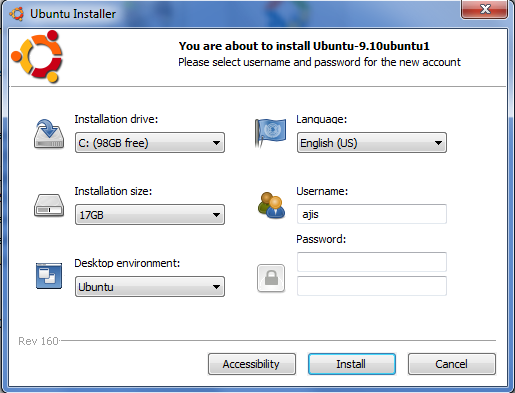
3. Double click on WUBI and you will see this screen.
by default, it will select C partition as installation drive, so you have to change to drive you want to install.

4. change the following:


1- Installation drive : change it to the partition you want to install ubuntu.
2 - select the size of your ubuntu installation, minimum 15GB (make sure after installation the space not less then 2GB.
3 -Insert password, it a must to continue installation.
---click Install--- 

5. After clicking install it will begin to install:

6. When it finish, you will be prompt to restart, restart your computer to continue installation.

7. After restart, on the boot selection select ubuntu.

8. After that, a screen will appear with a countdown 5, 4.... and at this part, you do not need to do anything, just wait it install untill it reboot. After reboot your ubuntu installation is complete.

IV. Some notes

1. So after finish installing, every time you turn on your computer you will see the OS selection, to use ubuntu simply select ubuntu.
2. You can remove ubuntu installation from control panel -add/remove program.
3. After log in to your ubuntu - run updates first.

------------------------------------------------------------------------------------------------
P/s: nothing important here, just if you want to read something (^^)
Ubuntu provide wubi to install ubuntu, i try wubi and it took me like forever to install it. I notice that wubi will first downloading the ISO file for installation (about 1-2 hour to wait). So, my idea is to download the ISO and place it with the wubi, so it will not download the ISO but instead use the ISO i downloaded earlier and it WORKS. I also notice that downloading ISO separately are faster the WUBI downloading it.
--------------------------------------------------------------------------------------------------

Sponsorship

Search This Blog

My Blog List

Total Tayangan Halaman

Advertising

Label

 
Powered By Blogger

statistik

Bottom Right