Rabu, 12 Oktober 2011

Windows 8 Driver

Like always, when there are new Windows, most of us want to try it even it still BETA release. I blog for drivers about 3 years now, and a lot happen after the windows 7 release. The most common problem is no support for old model use old devices.
So, i try windows 8 this week, I'm not really interested on the OS but to see what did we need a new drivers for windows 7?

Let us go to the Vista age for a while to look to the whole situation,
When Vista released, you can't use driver from windows XP, and most of the model design for Vista did not have support in their official site for windows XP. Later, many Vista User dissatisfied with the performance and want to use XP. Then the big problem is, you can install XP, but where is the driver?
Similarly when windows 7 comes, people still want to use XP or Dual-boot , so where is the driver? this is the reason i build this blog, as my journal, my reference, to gather drivers and solution for this type of problems.

Now comes windows 8,
There are no problems for newer model that design for windows 7, practically windows 8 driver are similar to those windows 7. I hope you guys don't misunderstand me, if you want to talk about direct X 12 or else, it is different from my intention. Example, after installing windows 8 you have no audio, so I'll try to find the driver so you get your audio in windows 8, but if the audio Quality is not as great as windows 7, it is a different topics.Not that i don't want to help, but i know myself, i know few things, and i don't speak something that I'm not really know about it.

I spent most of my time study the drivers and thousands of model, I'm not study the hardware specification in term of performance. The strength of window 7 is it automatically install most of your driver, and i believe this Microsoft enhance this feature,like em my desktop, after windows 8 installation, all driver installed properly.


Here i have initial opinion about the drivers:

CHIPSET/Motherboard etc:

INTEL
Inte 3,4,5 and 900 installed automatically, or by windows update. You can also use windows 7 drivers from intel website.

AMD:
South bridge Driver and Co-processor;
Windows 7 and vista drivers will do.

Nvidia:
Use windows 7  and vista drivers. For Older model, you modified inf to get it work.
XP driver may work on some model, the difficult thing is to get the right version. (laptopvideo2go is the best place to start)

GRAPHIC:
the pain is on older Intel graphic, like 82825/852GM GME and 915 graphic chipset. The method for windows 7 requires several steps to complete. Sadly in windows 8 the file in system are different and yet i still didn't found the solution. The best thing to do is look at microsoft update catalog, search for you chipset and install it manually.
For other graphic chipset, manual installation using Vista or 7 drivers normally work.

OTHERS:
card reader, bluetooth, LAN, Wireless,
You fuys don't really have to worry about this, from my experience, this driver not bring to much problems for users. Commonly these drivers installed along with windows installation.

I only tested with my desktop and not with any laptop yet.
This blog work with comments, all article and driver base on request, test and feedback, if you have something to share, I'm so grateful for that.


(p/s: again sorry for my English, as long as you understand my message)
Kamis, 01 September 2011

Conextant Audio Driver For Windows 7 64-bit

This guide made generally for all model, but the drivers made mostly for HP/compaq model. So if you ask me will this work for other model, the answer is YES but you need to get permission from HP so that your action is LEGAL. I do not hold any responsibility if you do it illegally, this post intend to help people who upgrading to Windows 7 64 bit and for tutorial purpose.

INTRODUCTION. (IMPORTANT TO READ)

Normally, in my post i just give a driver, or a simple tutorial to solve the problems. But there are lots of email i received asking how did i understand and know the solution. So i think it is important to describe the way to understand how to solve this problem. I normally didn't want to write a post in details because i know my English not really good so i always keep it short to avoid grammatical error. But i don't want to disappoint those who asked me. So I apologize in advance for my poor English.

There are many type of conextant audio. The way to distingush between them is by the HARDWARE ID(if you dont know what the hardware ID is, don't worry you'll get to it later). By names there are many of it;
-conextant smart audio 221
-Conextant Ac-link Audio
-Conextant High definition Audio
-Conextant AC97 Audio
-Conextant venice Audio
-conexant cx20671 Audio
-conexant cx20561Audio
and there is lot more, i just make the list of the popular names around the net. (i think there are no need for you to know all the list unless you are in this field, just pm me).

So the conclusion is there are many names, but the one differentiate between them is the hardware ID. So lets continue with the Installation for your driver.

1. IDENTIFY YOUR HARDWARE ID.

1. First, to get the right drivers, you need the hardware ID. to get the hardware id you can refer to my tutorial here:
http://getlaptopdriver.blogspot.com/2009/12/how-to-check-hardware-id.html

2. After you get the hardware ID you will get the result like this(the numbers different base on your device):

PCI\VEN_1002&DEV_4370&SUBSYS_3091103C&REV_02
PCI\VEN_1002&DEV_4370&SUBSYS_3091103C
PCI\VEN_1002&DEV_4370&CC_040100
PCI\VEN_1002&DEV_4370&CC_0401

3. Ok, from that list, pay attention to the line that i highlight, that is the important line to determine the hardware ID.  Note first line just added the &REV_02 , this addition &REV_02 added because you are using windows 7. So this is the reason why if you install using the windows XP or windows Vista driver directly it will failed, if you install manually from device manager some may success some may not because both xp and vista file doesn't contain &REV_02.
 variation may exist such as &REV_03 etc.The last line 3 and 4, the important line here to note is the number 1002 and 4370, this number show that this is audio type and it is conextant.

How to know the number in hardware ID represent what?
well just google it, many website contain information and database for this driver. That is why sometime realtek AC97 driver can be use to install driver for conextant ac link97 because both share the same ID. Some driver may have one or two ID, but some drivers may contain 100's compatible ID.

II . GETTING THE RIGHT AUDIO DRIVER FOR 64 BIT.

Ok, after you get the hardware ID, compare with the ID i gave below. Download and install the driver. Note that to install it you need to extract the driver (make sure winrar installed).
After that open the extracted folder. Right click at the setup file (exe: UIU.exe etc; name varies) and select run as admin and restart after installation finish.

1. Conextant 64 bit driver 1
PCI\VEN_1002&DEV_4370&SUBSYS_3091103C&REV_02
PCI\VEN_1002&DEV_4370&SUBSYS_3091103C
Download 

2. Conextant 64 bit driver 2
HDAUDIO\FUNC_01&VEN_14F1&DEV_5045&SUBSYS_103C30D9
Download

3.Conextant 64 bit driver 3
HDAUDIO\FUNC_01&VEN_14F1&DEV_5045&SUBSYS_103C30B5
HDAUDIO\FUNC_01&VEN_14F1&DEV_5045&SUBSYS_103C30CD
HDAUDIO\FUNC_01&VEN_14F1&DEV_5045&SUBSYS_103C30B2
Download

4. Conextant 64 bit driver 4
HDAUDIO\FUNC_01&VEN_14F1&DEV_5045&SUBSYS_103C30B7
HDAUDIO\FUNC_01&VEN_14F1&DEV_5045&SUBSYS_103C30BB
HDAUDIO\FUNC_01&VEN_14F1&DEV_5045&SUBSYS_103C30CF
Download

There are a lot of ID to cover but i list the most popular driver.
So if you didn't find your driver here just get the hardware ID for your audio and post in the comment section below. Ill help to find the appropriate driver.

_________________________________________
HARDWARE ID MATCH BUT INSTALL FAILED!

1. Ok if you try the driver above and failed do this:
-Open device manager (click start and type DEVMGMGT.MSC to open device manager).
-Right click on the audio with yellow and select update driver.
- Select browse my computer for drivers
- Select let me pick from a list of device drivers from my computer
-Select HAVE DISK and BROWSE
-Point to the extracted driver folder
-and select the INF file
-reboot

For those who have try many step in many website may read that SP38885 reported worked. but many not know that there are 2 version of SP38885, and the driver for the old one very hard to found.

Once again if you didn't find your driver here just get the hardware ID for your audio and post in the comment section below. Ill help to find the appropriate driver. To get the hardware ID refer nmy tutorial here:
http://getlaptopdriver.blogspot.com/2009/12/how-to-check-hardware-id.html

For a those who new to the driver stuff, it maybe hard for you to undrstand, but if you need my assistant to get the right drivers (because you don't understand well the method i post) i willing to do so. Just leave your comments.
Selasa, 30 Agustus 2011

Advent Quantum Q200 Windows xp driver

This is my first post for Advent product. So the drivers is not yet tested but i provide it base on the Devices information.

So as I always said, your feedback is really important to help others to get the proper drivers for windows XP.


CHIPSET.

This model using intel chipset so normally it will use the Intel 4,3 and 500 series chipset:

Intel 4 series chipset driver.

Download


GRAPHIC:

(note: please read intel license agreement before downloading!)

there are many site that give different specs but here i provide several driver base on the specs, so after you test it report back which work.


Intel GMA 4500MHD

Download


if didn't work try this:


Mobile Intel® 4 Series Express Chipset Family

Download


AUDIO:

Normally Quantum series use Conextant or Relatek Audio Driver, and there are 2 types of conextant which is venice (5041, there are many version of it) and ac link 97 which commonly and widely in year 2009 till now. So again you need to test which work. If no success, Then I need you to get me the hardware ID for the sound and post it here. to get the hardware ID you can refer my tutorial here: http://getlaptopdriver.blogspot.com/2009/12/how-to-check-hardware-id.html


Realtek High definition Audio Driver

Download


Conextant AC link 97

Download


WLAN:

Realtek RTL8191SE Wireless LAN 802.11n PCI-E NIC

Download (realtek site)

(select the Utility and Driver Auto Installation Program (Support Win2K/XP/Vista/Win7)(Install Shield v1.00.0182)


OR

Note that this driver file is small (about 30kb), but it contain no auto installation file. You need to manually install from device manager. For those who didn't know how to manually install it use the driver above. (i give this one in because the size is smaller and you can download it faster)

Download (realtek site)


ETHERNET:

JMicron 260 Fast Ethernet Controller

Download

There are also many latest or prior version of this driver,

you can refer here: ftp://driver.jmicron.com.tw/Ethernet/Windows/


CARD READER

Reader JMicron 38x Host Controller

Download


TOUCHPAD:

ElanTech Touchpad Driver v 8.0.7.0

Download
Selasa, 12 April 2011

Application Crash/Freez general solution

This is general post about application that crash/freez. I write this post as a reply to this comment:


waris said...

hi, i read u r reply and i feel that u can help me out, plzzzzzzzzzzz when i start working on MS word after some time my system get freez and it become hang in that situation no option remain except direct power off through power button plz help me wat i do
1.Uninstall and reinstall.
-One of the common thing to do is  to unistall and reinstall the software. Restart your PC and see if it fix it.

Complete unistall guide: (make restore ponit first!)
Unistalling via control panel is not completely remove all the files.
(example ms office)
-unistall from control panel. -office 2007
-remove form program file -c:\program files\office 2007
-remove from registy (click start select run and type REGEDIT) and the rest read here

2. System Restore:
-this is also a popular solution. You can read it here.

3. Low memory capacity and background running program:
- RAM require to support any application that run in your system. If there are too many application running at the same time, it will consume your memory and causes crash/freez/slow performance. Some of you maybe know or don,t that when you start your PC, there are programs that automatically start. The solution is

a. Remove unnecessary startup program:  
- Click start and run type MSCONFIG (win xp)  click start and type MSCONFIG on search box (win 7)
-  Select STARTUP, there you will see many programs that run when your PC start.
-So, remove any unnecessary programs by uncheck the checkbox. It will speedup your PC and may solve your crash problem.
-NOTE: it is important to differentiate which is the system file and which is not. Example AdobeARM - you can remove this.


b. END process at Task manager.
-open task manager by right click at taskbar and select Task Manager or press CTRL + Alt + Del
-select Process, look if there high memory usage. Right click on unncessary program and select end task.

The good thing and The bad thing abou A and B.

Good:
-it will speed up your pc
-and it may solve your problems.

Bad
-there are problem to check which you have to terminate and not to.
(normally i use google to check it)

4. High temparature: -well get urself a fan.

5. Virus - antirus etc( suggestion: avira and malwarebyte)

thats all, have anything to share? leave your comments
Jumat, 04 Februari 2011

Benq Joybook R45 Windows 7 Driver

---------------------------------------------------------------
notes:
(most of the file i upload in mediafire)
1. i recommend to install windows 7 ultimate or professional, avoid using starter edition and home premium
2. After windows 7 installation finish, check your audio and wireless, if both are working then you dont have to install wireless and audio driver.
4. You need to install winrar software, because most of the driver file are in RAR format (archieve). So most of the time you need to extract the driver to install.
5. Install according to order.
-------------------------------------------------------------------------------------------

drivers for windows 7:

chipset:
Mobile Intel(R) PM965/GM965/GL960
Download

Storage IMSM:
Intel matrix storage manager
Download link: http://www.mediafire.com/?3fy3kklxdoa

Audio:
Realtek High Definition Audio
Download link: http://www.mediafire.com/?ob6xb7xe9u6u18s

Graphic:
NVIDIA GeForce 8400M G
Download limk: http://www.nvidia.com/object/notebook-win7-winvista-266.58-whql-driver.html


GUIDE installing graphic driver:

1. If direct install failed, do manual installation.
2. First open device manager by click start and on the serach box type DEVMGMT.MSC
3. At the list of the devices, look at the Display adapter and press the > sign to expand the list you will see the standard VGA listed.
4. Right click on the standard VGA select Update Driver.
5. Select browse my computer for device driver software.
6. Select let me pick from a list of device drivers in my computer.
7. Then select Have disk and select Browse
8. Browse through C:\Nvidia - DisplayDriver - 266.58 - Vista - International - Display.Drivers
9 Select the nvac.inf or nvam.inf. Continue with on screen instruction. You will see many list of graphic driver, or maybe one, select Nvidia 8400M G

Bluetooth:
Toshiba Bluetooth driver stack
Download link: http://www.mediafire.com/?812gq5jz8n14th5
-------------------------------------------------
installation instruction:
Right click on the file:
silent_install_for_Vista_Win7.
bat
and select "Run as administrator"

--------------------------------------------------

Ethernet:
Realtek RTL8168C(P)/8111C(P) Family PCI-E Gigabit Ethernet NIC
Download 
Direct install may resulting in error, Read how to install this driver here

Wireless:
Atheros AR5007EG Wireless Network Adapter
Download Link: http://www.mediafire.com/?7w38j1ll3u8dvv7
You must install manually from the device manager, you can refer to my tutorial here how to install the Driver.
Installing Atheros AR5007EG in wndows 7.

Card Reader:
 Ricoh RL5C592 Memory Stick Bus Host Adapter
For the ricoh card reader i have 2 drivers version, try which work,
Ricoh 5 in 1 card reader :  http://www.mediafire.com/?e4qwpxz8ass471p

Modem:
Motorola SM56 Data Fax Modem
Download link: http://www.mediafire.com/?l0b5298nk3s4z97

Webcam:
Chicony CNF7129 Webcam Driver
DriverName=USB2.0 UVC 2M/1.3M WebCam
HardwareID2=USB\Vid_04f2&Pid_B071&MI_00
Download link: http://www.mediafire.com/?mm94g0rnw69jtyv
====================================================================

1. After all installation finish, if there are problems during installation provide me with the error details.
2. To check if there are driver missing, you can refer to my tutorial here how to check your driver in windows 7:
http://getlaptopdriver.blogspot.com/2011/01/check-your-driver-in-windows-7.html
3. In windows xp you required KB888111 to install audio but not in winddows 7 so do not worry about that.
4. In windows Xp they also provide Touchpad and ATK driver, from my experience ATK only for xp,
for the touchpad if you need it ill try to find it but for me its not important.
5. I didnt upload the nvidia file, just download it from the link i gave, the file too large and my limit is 100mb/upload.
Kamis, 03 Februari 2011

Install Ubuntu Inside Windows (WUBI)

In this tutorial I will show how to Install Ububtu inside windows (dual boot windows and ubuntu)

===========================
CONTENTS:
===========================
I. Downloading ISO and WUBI file
II. Selecting Partition
III. Installing Ubuntu
IV. Some Notes
==========================

I.  Downloading ISO and WUBI file

1. Ubuntu ISO file : Download here
(select the latest version from drop down menu and select 32-bit if you are new to ubuntu)
(note that the latest is 10.10 and over time there will be other release)

click on the picture to enlarge


2. WUBI Installer: Download here


Save both file and wait until. download finish.

II. Selecting Partition

1. You can use any partition you want because it will not clean up your data on the selected partition.
2. You can easily remove ubuntu installation via add/remove program from control panel.
3. Make sure you partition have at least 17GB free. (minimum space is 15GB)

III. Installing Ubuntu

1.  Here i select one of my partition -  D partition, and i rename it with ubuntu.


2. After finish download both file, palce them in D drive (or any partition you want to install ubuntu)


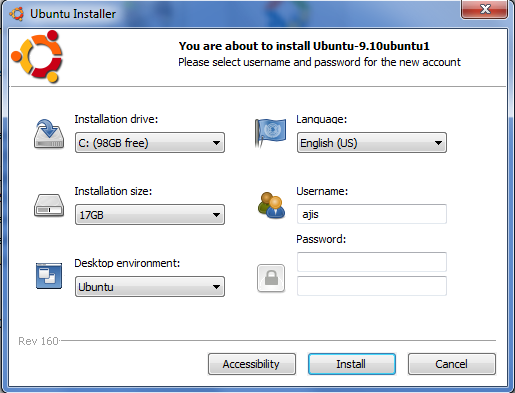
3. Double click on WUBI and you will see this screen.
by default, it will select C partition as installation drive, so you have to change to drive you want to install.

4. change the following:


1- Installation drive : change it to the partition you want to install ubuntu.
2 - select the size of your ubuntu installation, minimum 15GB (make sure after installation the space not less then 2GB.
3 -Insert password, it a must to continue installation.
---click Install--- 

5. After clicking install it will begin to install:

6. When it finish, you will be prompt to restart, restart your computer to continue installation.

7. After restart, on the boot selection select ubuntu.

8. After that, a screen will appear with a countdown 5, 4.... and at this part, you do not need to do anything, just wait it install untill it reboot. After reboot your ubuntu installation is complete.

IV. Some notes

1. So after finish installing, every time you turn on your computer you will see the OS selection, to use ubuntu simply select ubuntu.
2. You can remove ubuntu installation from control panel -add/remove program.
3. After log in to your ubuntu - run updates first.

------------------------------------------------------------------------------------------------
P/s: nothing important here, just if you want to read something (^^)
Ubuntu provide wubi to install ubuntu, i try wubi and it took me like forever to install it. I notice that wubi will first downloading the ISO file for installation (about 1-2 hour to wait). So, my idea is to download the ISO and place it with the wubi, so it will not download the ISO but instead use the ISO i downloaded earlier and it WORKS. I also notice that downloading ISO separately are faster the WUBI downloading it.
--------------------------------------------------------------------------------------------------
Sabtu, 15 Januari 2011

Check Your Driver In Windows 7

Anonymous said...
I am using Compaq Presario CQ41-110AU and Windows 7, but I have no idea whether any drivers already installed or not :(
because I asked my friend to re-install my laptop.
How to find out what drivers have not been installed yet? and I also need MS Office for Win 7, how to install it?
Thank you in advance.

This guide will show you how to check your computer device driver so that you can identify which driver you need to install. This guide apply for windows XP, Vista and 7.

1. First we use device manager to check our devices. To open device manager click start and on the search box type DEVMGMT.MSC

2. Then a device manager will open. There you will see list of devices of your computer.

a) A computer with all the drivers installed will show no yellow mark in the device manager


b) while the computer with incomplete driver will show yellow mark. But for your graphic (Display), it will show Video controller with yellow mark or under the display adapters it will show Standard VGA Graphic adapters.

3. So now you can identify weather your computer driver is missing driver or not. So the problems is how to get the right Driver.

a) If you know yor computer model say Lenovo Ideapad s10, so just type "Lenovo Support" on google and enter the support site. So browse for your driver there.

b) If it appear that you didn't know what is your model. You can get the hardware ID for the devices and search the hardware ID on google.

c) Lastly, You can request your driver here in Request section.
Selasa, 21 Desember 2010

Disk Management COnsole View is not Up to Date

This problem occur often in windows 7 when you insert card ready or other storage (USB) in your computer.
In this post i will describe:

1. Overview : some information regarding the problems
2. Solution: To overcome the problem


---------------------
1. OVERVIEW
---------------------
Normally this happen when you insert CARD READER or Other storage (2ndary storage) and your computer failed to detect it. This normally happen in Windows 7 and may occur in other Operating system. Regardless of 32 bit and 64 bit the solution is still the same if you having the problems which i describe above.

So to see if the storage detected or not we open disk management to check the devices. for those who don't know how to open device manager, click start and type in DISKMGMT.MSC


After that the disk management windows will open and you can see your storage appear but when you right click you can't format, change driver letter or path or even select properties:


Here is the error you will get when you try to format or select properties.

---------------------
2. Solution
--------------------

1. Open device manager by click start andtype DEVMGMT.MSC

2. A device manager windows will open, click VIEW and click at the SHOW HIDDEN DEVICES.

3. After that look for UNKNOWN DEVICES devices list, if you can't find it, expand the storage volumes list.


4. Ok, next right click on the Unknown devices, select uninstall,
5. Then right click again on any place there, select scan for hardware change.
6. The a new hardware Wizard will appear, follow the on screen instruction.

Your PC will detect the card reader after the installation finish.

If you have any question or suggestion to improve this post, please leave your comments.
Senin, 20 Desember 2010

Check Devices Driver in Windows 7

In this tutorial I will show how to check your device driver in Windows 7.

TO check PC or laptop have all the drivers it need, you can use Device manager.

OPEN DEVICE MANAGER
Click start and on the search box type DEVMGMT.MSC

CHECK THE HARDWARE
If there are drivers which yet not installed in your system, you will see the list with yellow mark.
For Graphic, it will show the exact graphic driver model, if it show Standard VGA means you need to update your graphic driver.

If you have any problems or questions leave your comments.
Jumat, 17 Desember 2010

SOLVED: Windows Media Player cannot play this DVD because a compatible DVD decoder is not installed on your computer.

OK, this afternoon, a guy from FIJI asked me about the DVD problem. He said that he cannot play the DVD with the error

"Windows Media Player cannot play this DVD because a compatible DVD decoder is not installed on your computer."

OK this cause by missing decoder or the decoder not installed. If you browse Microsof website the solution is:

click start - run - type dvdupgrd /upgrade

OK, for me there is another solution that i like and my favourite which is installing codec packs. The price is FREE.

I recommend installing these codec pack to solve the problems:

K-lite codec pack (FULL)
XP codec pack
Tiger Player/MPCstar

Not necessarily you need all of those, in my PC I install Klite Codec pack, tiger player, Real Player, Real alternative and Windows Media Player Classic.
Selasa, 30 November 2010

Acer driver for windows 7

After windows 7 arrived, many acer laptop user including me try the beta version and now there are several version available. So, the question after the installation of windows 7 is the driver.

HOW TO GET ALL DRIVERS FOR MY ACER (WINDOWS 7)?

Before we do some installation, please run automatic updates and see if there are any updates for your driver.
to check your driver installed or not, just simply click start, on the box type DEVMGMT.MSC and press enter, you should see a windows open with list of your devices. If you see any yellow mark,then you need to find driver for it.

1. Ok first of all the new model shouldn't worry about it because Acer provide the drivers (if you don't have ot or dont find it just leave your comment, ill list it for you) - it all should be listed in acer support page.

2. for bit older model - your vista driver may work. If not try right click on the installer and select properties, then select compatibilities and select windows vista, the click apply. After that right click again and select run as administrator.

3. Find the drivers on the components manufacture site. Every model has it own manufacture, sch as audio eg: Realtek . So if acer just provide a vista audio driver for realtek. just simply go to realtek site and download the latest driver for windows 7.

4. For very old model - maybe quite difficult for you to find several driver. and some of you can't event enable aero. Ok for this one i can assist you, just give me your model and your hardware ID.

P/s: if you like to do some experiment, why not try download driver from other model but with same manuufactre component, and same model, say atheros AR5xxxx, download and test, but please if you new to hardware and driver, please don't try this experiment on your laptop. cheers

Compaq Audio Driver

Compaq have many model that equipped with certain manufactures audio components. From my experience working with Compaq/HP, there are 3 major type of AUDIO component they use which is REALTEK, IDT - high definition audio devices and conexant.

The problems occurred When Windows Vista arrived, many laptop such as CQ40 and CQ35 model have problems with windows XP installation and installig the Driver especially AUDIO. However i have write posts to solve the problems which you may refer here:

Slipstreaming Guide To install Windows XP

Slipstreaming guide here is a method for those who do not have external floppy drive. And for those who have the external floppy drive may install the XP directly without the slipstreaming process.

For the Audio especially for compaq CQ40 and CQ35 (may also work with vista bae model which use IDT),
I write 2 post how to install the audio driver:

General Audio Installation

and for those who have problems with audio disappear after restart this poost may help you.
For those who use realtek you just need to download the latest realtek driver from the realtek site.
Hope this article help and if you have any question feel free to leave your comments.
Sabtu, 10 April 2010

How to check your laptop and computer driver

For those who new to computers and drivers, simply drivers needed to connect your hardware and your operating system,
example you have the card reader slot, card reader device/slot is a hardware that equipped in most notebook and laptop.
So after your laptop installed with Operating system, you need to install the card reader driver to enable your windows to recognize your hardware so that you can use it.

DO MY COMPUTER/LAPTOP HAVE ALL THE DRIVERS NEEDED?
-So, if you are thinking do your laptop/computer have all the driver needed? There is a software/tool to check and manage your devices and drivers which already installed along with windows, it is DEVICE MANAGER.
This tool is very useful especially when you have problems to install drivers and also to check weather your laptop have all the driver needed. So to check your drivers, first we need to know how to open device manager.


OPEN DEVICE MANAGER AND CHECK YOUR DRIVER:

1. Click start and select run.


2.. Type DEVMGMT.MSC and press Enter

For windows Vista and Windows 7
-click start and on the search box type DEVMGMT.MSC-


3. A new windows will open and you can see your devices listed there.

This are the picture show all driver installed correctly.

-------------------
This picture show there are missing driver, how do we know that there are missing driver? Just look at the device manager, if there are yellow exclamation/Question mark on the list like the picture below means the driver still missing .


So now, open your device manager and check it now =)

p/s: Installing all driver is NOT A MUST, example you do not want  use your LAN/ETHERNET connection, so no need to install that.
Minggu, 13 Desember 2009

Installing Conexant CX20468-31 AC97 Audio Driver in windows 7

This is my suggestion base on information i collected on the web, so your feedback are most appreciated.


INSTALLING  Conexant CX20468-31 AC97 Audio Driver IN WINDOWS 7.

Before using using this guide below, i recommend you to try install this drivers first see if it works or not:


Conexant CX20468-31 AC97 Audio Driver and Audio Driver EQ
Download SP34789

and also this driver which i already modified:

SP30399 (mod)
SP34798(mod)

If failed this guide may help you to install it.
=============================


There are 2 method to install:


1. Edit the drivers ID
2. Manually install the drivers via task manager


====================
1. Edit the driver files
====================


1. Download the

WINDOWS XP DRIVERS
Conexant CX20468-31 AC97 Audio Driver and Audio Driver EQ
Download SP30399


2. right click and select run as administrator,


3. Then proceed the installation until the installation windows appear.


4. install it and ignore if its error, now we need to find our audio hardware ID first.

Follow Guide here to find your hardware ID, when you get it remember to paste the hardware ID in notepad (for further reference). The result should be like this, the ID is mine realtek audio and not conextant so your ID may differ from mine:


6. Now open c:\swsetup\sp30399


7. Now in the sp30399 folder find the qta3091.inf and open the files.


8. Now find the values i highlight in the picture below.


9. Then paste your hardware ID below the line %*WDM_AMCAUD.DeviceDesc%=WDM_AMCAUD,PCI\VEN_1002&DEV_4370&SUBSYS_3091103C with your hardware ID  in STEP 4.

so the line may look like this:

[Conexant]
%*WDM_AMCAUD.DeviceDesc%=WDM_AMCAUD,PCI\VEN_1002&DEV_4370&SUBSYS_3091103C
%*WDM_AMCAUD.DeviceDesc%=WDM_AMCAUD,PCI\VEN_10B9&DEV_5451&SUBSYS_0024103C&REV_02


Notes: 
The method above use the SP30399 which is XP drivers, you may also test with SP37489 using the same method.


=================
2. Manual Installation
================= 

You need to download and install  SP34789
1.First open device manager by click start and select run type "devmgmt.msc" as shown in the pictures below.


 2. Then on the audio with yellow mark right click and select update driver.


 3. Then select browse my computer for the Driver software


4.Then select let me pick from a list of device drivers on my computer.


5. Then select have disk and select browse


6. Browse to SP34789 and select the Qta3091.inf.
7. Proceed with on screen instruction. Ignore if it complaint.

NOTE:
you may also try with SP30399 at step 5.
Selasa, 08 Desember 2009

Guide to Install 7 Unknown Device

THIS GUIDE CREATED BY IVAN CONTAIN TWO INSTALLATION METHOD:

1. AUTO INSTALLATION
2. MANUAL INSTALLATION.

==========================
PART 1: AUTO INSTALLATION
==========================
notes: click the picture to enlarge:

1. Open device manager by click start, run, type DEVMGMT.MSC

2.On the device manager, right click on the unknown devices, select update driver.


3. Then a hardware update wizard will appear, select no not this time.


4. On the next screen select install the driver software automatically.


5. Then just wait until the windows finish copying and installing the drivers.

6. After that click finish.

7. You would be able to see there are no more unknown device in the device manager, that means the driver are successfully installed.


========================
2. MANUAL INSTALLATION.
========================
1. Open device manager by click start, run, type DEVMGMT.MSC

2.On the device manager, right click on the unknown devices, select update driver.


3. Then a hardware update wizard will appear, select no not this time.


4. Select Install from a list or specific location (ADVANCE).


5. On the next screen , select don't search, i will choose drivers to Install


6. select  Show All Devices, next.


7. Here select have disk.


8. Then select Browse


9. Then browse to the 7 unknown devices driver folder, (i recommend to put the 7 unknown device at desktop to make your work easier)


10. Select the machine.inf file and press open.


11. After press open it should look like this.


11.After press ok, select next.


12. It should copying and installing the drivers now, ignore if XP complain.


 13. AFter finish, there should be no more unknown device in the device manager.

Sponsorship

Search This Blog

My Blog List

Total Tayangan Halaman

Advertising

Label

 
Powered By Blogger

statistik

Bottom Right